
The Highley House wasn’t on the client’s list of properties to tour.
The building in Miami’s Wynwood neighborhood had high ceilings and raw concrete interiors. The Colliers team could see how it might work for the tenant. The tenant was having a harder time picturing it.
.jpg)
During our recent webinar, Carmen Aquino, Senior Marketing Specialist at Colliers, shared how her team got the property into consideration. They used qbiq test fits and a 3D walkthrough to create a custom interactive landing page showing layouts tailored to the client’s needs.
The page helped secure a tour. Once the client arrived, the team had another idea ready: a projector displaying the walkthrough on a wall inside the unfinished space.
A different way to show an empty floor
The projection let the client see a proposed office while standing in the concrete shell where it could be built.
As Carmen explained, the team could “take the visualization out of the brochure and put it right into the physical environment.”
By the time of the webinar, the property had reached the client’s shortlist. The deal was still in progress, but a building the client hadn’t wanted to consider was now a serious option.
Carmen’s team made the plans and walkthrough available before the visit, then brought them into the tour itself. Prospects could look around the actual floor and refer to the proposed layout as they discussed how their team might use it.
What was getting in the audience’s way?
In our live poll, difficulty helping tenants picture the space was the most-selected obstacle to marketing non-trophy listings, followed closely by waiting for test fits and layouts.
- Tenants can’t picture the space: 32%
- Waiting on test fits and layouts: 28%
- No budget for visuals: 24%
- No reliable floor plan or supporting data: 16%
Carmen’s example addressed both leading concerns: giving the client a clearer picture and getting the materials ready while the opportunity was still active.
What can fit on the same floor?
Ronit Amitay, qbiq’s CPTO, demonstrated how three layouts for a sample 25,000-square-foot floor could serve different requirements:
- Alternative A: 124 seats, at approximately 202 square feet per person.
- Alternative B: 101 seats, at approximately 248 square feet per person.
- Alternative C: 110 seats and 19 conference rooms.
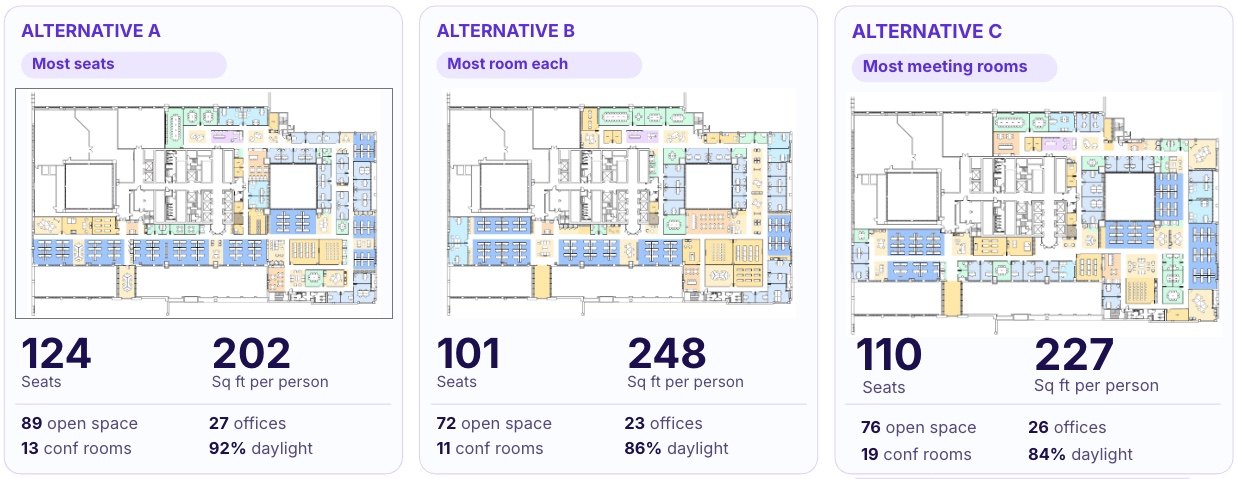
A tenant prioritizing headcount could compare the first option with one offering more room per person or more meeting space. The numbers gave them a basis for evaluating the alternatives.
Ronit then showed a 3D walkthrough of one layout. A floor-plan view tracked the viewer’s position as they moved through the office, making it easier to connect the interior view with the plan.
When the client asks for a change
Carmen described the questions that come once a prospect starts imagining their business in the space: could they add private offices, create more collaboration space or enlarge a conference room?
A law firm and a technology company may need very different layouts. She discussed using qbiq’s redlining capabilities to explore changes and tailor the proposal to each client.
She also explained how turnaround affects those conversations. Through a traditional process, a complete package could take at least two weeks, extending to a month with revisions. With qbiq, she described receiving plans and walkthroughs in about 24 hours.
That allowed her team to return to clients sooner and reduced the preliminary work going to busy architects. When requirements became more complex, they could bring in the architecture firm.
Ronit explained how qbiq supports that speed: AI handles the planning process alongside personalized service and architect review and verification. The aim is to give listing teams materials they can put in front of a prospect while the conversation is still active.
Making a walkthrough more specific to the prospect
Gal Markovich, qbiq’s Product Manager, previewed upcoming tools for customizing 3D videos.
In the demonstration, he changed a tenant logo and switched material themes while keeping the underlying layout the same. He also showed options for presentation settings and furniture styles.
These changes address a familiar request: the walkthrough works, but the team wants to adjust a detail for the next prospect. Gal described how the new tools are being developed to give users more direct control and shorten the wait for those revisions.
Practical questions from the webinar
What do I need to provide to get started?
qbiq accepts files including CAD, Revit, PDF and JPEG, along with the project requirements. You can provide a detailed brief or start with a broader description, such as the type of business the space needs to accommodate. The team can help develop that into planning requirements.
How are ceiling heights, windows and other building details captured?
Those details can be extracted from a Revit file or supplied during submission. Providing the relevant dimensions and specifications helps the plans and 3D outputs reflect the property.
Can I use different furniture and materials?
qbiq offers furniture collections and themes, along with a customization service for specific requirements. The webinar also included a preview of upcoming tools for changing furniture styles, finishes and branding within 3D videos.
How is qbiq priced? Can it work for a smaller practice?
Pricing is tailored to the scope of your work, how much space you expect to plan and any customization you need. We start with a conversation to understand your projects and how you’d use qbiq. From there, we walk you through the options and costs that fit your needs.
If you’re a solo practitioner or exploring qbiq for a specific project, we’re happy to discuss what could work for you. Talk with our team about your needs, book a one-on-one conversation.
Watch the full conversation
At the start of the webinar, we asked everyone to think of one listing whose potential they kept having to explain.
If a property comes to mind, watch the session with it in view. You’ll see Ronit compare the layouts, hear Carmen describe the Colliers approach and watch Gal demonstrate the upcoming 3D tools. The recording also includes the audience Q&A.
The full Colliers × qbiq session is free to watch on demand, no form required.





.png)


